How Does PostgreSQL Decide How to Execute a Query?
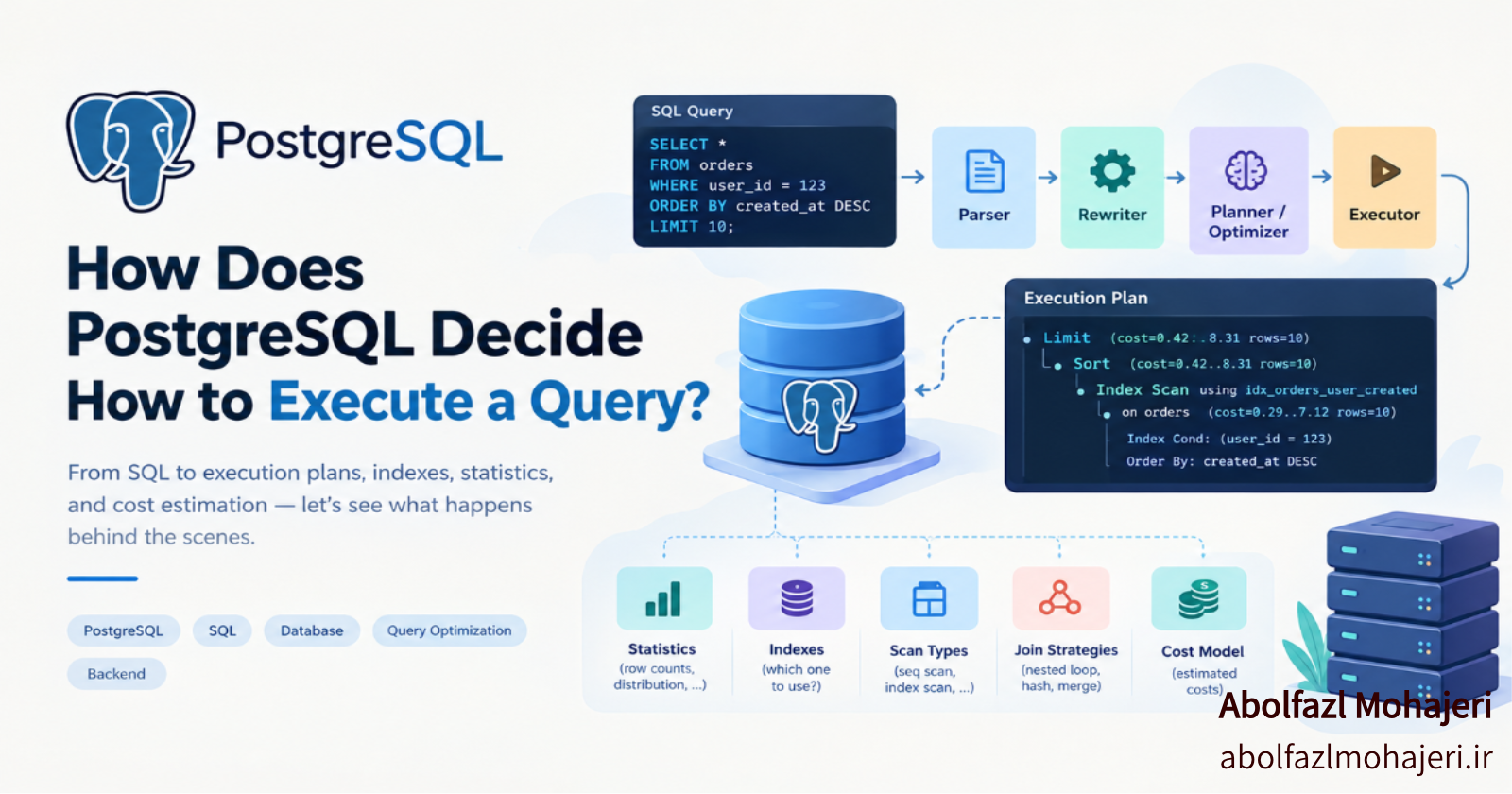
When you send a SQL query to a database, have you ever wondered what actually happens behind the scenes?
Consider the following query:
SELECT *
FROM orders
WHERE user_id = 123
ORDER BY created_at DESC
LIMIT 10;
At first glance, this looks like a straightforward request. We want the latest 10 orders belonging to a specific user.
But PostgreSQL has several decisions to make:
- Should it read the entire table or use an index?
- Which index should it use?
- How should it filter and sort the records?
- Can it retrieve the data directly in the required order?
- If multiple tables are involved, which join strategy should it choose?
Interestingly, we only describe what data we want, while the database decides how to retrieve it.
This decision-making process is handled by a component called the Query Optimizer.
Let's explore how it works and how we can understand its decisions.
1. From SQL to an Execution Plan
When a query is submitted to PostgreSQL, it goes through several stages before execution.
A simplified representation of this process looks like this:
SQL Query
   |
   v
Parser
   |
   v
Rewriter
   |
   v
Planner / Optimizer
   |
   v
Executor
   |
   v
Query Result
Each stage has a specific responsibility.
Parser
The parser checks whether the SQL statement is syntactically valid. It also resolves database objects such as tables, columns, and functions.
For example, it verifies that the referenced table and column names can be resolved.
Rewriter
The rewriter transforms the query according to PostgreSQL's internal rules.
For example, views and the rule system can introduce query transformations at this stage.
Planner / Optimizer
This is where most of the interesting performance-related decisions happen.
The planner considers different execution strategies, estimates their costs, and selects an execution plan that it expects to be efficient.
Executor
Finally, the executor runs the selected plan and produces the requested result.
In other words, PostgreSQL does not simply execute SQL statements line by line. It first transforms them into an execution plan.
2. What Does the Query Optimizer Actually Do?
Imagine we have a table containing 10 million records:
CREATE TABLE orders (
    id BIGINT PRIMARY KEY,
    user_id BIGINT,
    amount NUMERIC,
    created_at TIMESTAMP
);
Now consider this query:
SELECT *
FROM orders
WHERE user_id = 123;
PostgreSQL has multiple ways to retrieve the matching records.
Option 1: Sequential Scan
The database reads the table sequentially and checks every row to determine whether user_id = 123.
Option 2: Index Scan
If an appropriate index exists, PostgreSQL can search the index first and then retrieve the corresponding table rows.
We can create an index like this:
CREATE INDEX idx_orders_user_id
ON orders (user_id);
So, which approach is better?
The answer is: it depends on the data.
If only 10 out of 10 million rows match the condition, using an index is likely to be more efficient.
However, if 8 million rows belong to the same user, reading the entire table sequentially might actually be cheaper.
Why?
Because using an index is not free. PostgreSQL may need to read the index, locate the corresponding table rows, and fetch data from potentially scattered locations on disk.
When a large portion of the table is required, sequential access can be more efficient than performing many random reads.
This leads to an important principle:
Having an index does not mean PostgreSQL will always use it.
The optimizer evaluates available strategies and chooses the one with the lowest estimated cost.
3. How Does PostgreSQL Know How Many Rows Exist?
This brings us to one of the most important parts of query optimization: Statistics.
To make good decisions, the query planner needs information about the underlying data.
For example:
- How many rows does a table contain?
- How many distinct values exist in a column?
- Which values appear frequently?
- How many NULL values exist?
- How is the data distributed?
PostgreSQL collects and maintains statistics about database tables and columns. These statistics are stored internally, including in the pg_statistic system catalog.
You can update statistics manually using:
ANALYZE orders;
PostgreSQL generally uses sampling to collect statistics, rather than examining every row.
This means its estimates are not necessarily exact.
For example, the optimizer might estimate:
Estimated Rows: 100
But during actual execution, the query returns:
Actual Rows: 500000
Such a large difference can lead to a poor execution plan.
The optimizer might have selected an index-based strategy because it expected very few matching rows, while the actual data distribution made that strategy expensive.
This is why keeping database statistics up to date is important.
PostgreSQL's Auto-Vacuum and Auto-Analyze mechanisms usually help maintain these statistics, but there are situations where manual investigation is necessary.
4. What Is Query Cost and How Is It Calculated?
The optimizer needs a way to compare different execution strategies.
PostgreSQL uses an internal cost model to estimate the resources required by each possible plan.
For example, an execution plan might contain:
Seq Scan:
cost=0.00..250000.00

Index Scan:
cost=0.29..120.50
At first glance, the second option looks much cheaper.
But there is something important to understand:
Query cost is not actual execution time in milliseconds.
It is an estimated value used by PostgreSQL to compare execution plans.
The cost model considers several factors, including:
- Sequential and random page access costs
- CPU processing costs
- Estimated number of rows
- Sorting operations
- Join operations
- Other execution-related operations
PostgreSQL exposes several configuration parameters that influence this model:
SHOW seq_page_cost;
SHOW random_page_cost;
SHOW cpu_tuple_cost;
SHOW cpu_operator_cost;
For example:
seq_page_costrepresents the estimated cost of reading a page sequentially.random_page_costrepresents the estimated cost of reading a page randomly.cpu_tuple_costrepresents the estimated CPU cost of processing a row.cpu_operator_costrepresents the estimated cost of processing an operator or function.
These parameters influence how PostgreSQL evaluates different execution strategies.
One important consequence is that a plan with a lower estimated cost is not guaranteed to have a lower real execution time.
Factors such as caching, storage performance, system load, and data transfer can affect actual performance.
5. Types of Scans in PostgreSQL
PostgreSQL supports several ways to access table data.
Understanding these scan types is essential when reading execution plans.
Sequential Scan
A Sequential Scan reads the table's pages sequentially.
It is often a good choice when:
- The table is relatively small.
- A large portion of the table needs to be retrieved.
- Sequential access is cheaper than fetching many individual rows through an index.
Index Scan
An Index Scan searches an index to locate matching rows and then retrieves the corresponding table records.
It is commonly useful when a query needs only a small portion of the table.
Index Only Scan
An Index Only Scan retrieves the required data directly from the index without needing to access the table's heap for every row.
However, PostgreSQL must also verify tuple visibility.
This is where the Visibility Map becomes important. If the relevant heap pages are marked as all-visible, PostgreSQL can avoid heap access for those rows.
Otherwise, additional heap fetches may still be necessary.
Bitmap Index Scan / Bitmap Heap Scan
These two operations often work together.
First, PostgreSQL uses an index to collect the locations of matching rows.
Then, it uses a bitmap to organize those locations and retrieve the corresponding table pages more efficiently.
This approach can be useful when a query needs a moderate number of rows and a regular Index Scan would involve too many scattered table accesses.
6. How Does PostgreSQL Choose a Join Algorithm?
Another interesting part of query optimization is joining multiple tables.
Consider the following query:
SELECT *
FROM users u
JOIN orders o ON o.user_id = u.id;
PostgreSQL has three main join strategies:
Nested Loop Join
For each row from the outer relation, PostgreSQL searches for matching rows in the inner relation.
This approach can be extremely efficient when:
- The outer relation contains relatively few rows.
- The inner relation has a suitable index.
- Each lookup can retrieve matching rows quickly.
However, if the outer relation contains many rows and the inner relation requires repeated full scans, the cost can become very high.
Hash Join
PostgreSQL builds an in-memory hash table from one input relation.
It then scans the other relation and probes the hash table to find matching records.
Hash Join is often a good choice for joining larger datasets when the join conditions and available memory make it suitable.
Merge Join
Merge Join requires both input relations to be ordered by their join keys.
PostgreSQL then processes both sorted inputs simultaneously, matching rows as it moves through them.
The required ordering can come from existing indexes or explicit sorting operations.
None of these algorithms is universally better than the others.
The optimizer chooses a strategy based on estimated input sizes, available indexes, data ordering, and other cost-related factors.
7. Execution Plans: See What PostgreSQL Decided
So far, we have discussed the decisions PostgreSQL makes internally.
But how can we actually see which strategy it selected?
The answer is EXPLAIN.
EXPLAIN
SELECT *
FROM orders
WHERE user_id = 123;
The output might look something like this:
Index Scan using idx_orders_user_id on orders
  (cost=0.29..8.31 rows=1 width=48)
  Index Cond: (user_id = 123)
Let's break it down:
Index Scan: The selected access method.idx_orders_user_id: The index being used.cost=0.29..8.31: Estimated startup and total costs.rows=1: Estimated number of output rows.width=48: Estimated average row width in bytes.
There is another important concept here:
An execution plan is a tree of operations.
The nodes at the bottom of the tree usually retrieve the initial data. Higher-level nodes perform operations such as:
- Filtering
- Sorting
- Joining
- Aggregation
When reading an execution plan, it is helpful to start from the bottom and work your way up.
This allows you to understand how the data flows through the different operations until PostgreSQL produces the final result.
8. EXPLAIN ANALYZE: Compare Estimates with Reality
EXPLAIN shows the execution plan and estimated costs.
But what if we want to see what actually happened during execution?
We can use EXPLAIN ANALYZE.
EXPLAIN (ANALYZE, BUFFERS)
SELECT *
FROM orders
WHERE user_id = 123;
Unlike plain EXPLAIN, this command actually executes the query and reports runtime information.
For example:
Index Scan using idx_orders_user_id on orders
  (cost=0.29..8.31 rows=1 width=48)
  (actual time=0.020..125.300 rows=500000 loops=1)

Buffers: shared hit=1200 read=8500

Planning Time: 0.300 ms
Execution Time: 130.500 ms
There is an interesting problem here.
The optimizer estimated that the query would return only one row, but it actually returned 500,000 rows!
This difference might indicate outdated statistics or a data distribution that the optimizer could not estimate accurately.
Let's look at some important fields.
actual time
The actual execution time of a plan node, measured in milliseconds.
actual rows
The actual number of rows produced by the node.
loops
The number of times the node was executed.
Buffers
Information about database pages accessed during execution.
shared hit: Pages found in PostgreSQL's shared buffers.shared read: Pages that had to be read into shared buffers.
Planning Time
The time PostgreSQL spent generating the execution plan.
Execution Time
The time spent executing the query.
One important detail: when a node runs multiple times, its displayed actual time and actual rows are averages per execution. To understand its total contribution, you should also consider the loops value.
Also remember:
EXPLAIN ANALYZE actually executes the statement.
For UPDATE, DELETE, and other data-modifying statements, this means the changes are really applied.
When testing such statements, consider using a transaction and rolling it back:
BEGIN;

EXPLAIN ANALYZE
UPDATE orders
SET amount = amount + 10
WHERE user_id = 123;

ROLLBACK;
Keep in mind that rollback does not reverse every possible side effect, such as external actions performed by triggers.
9. Why Can a Query Be Slow Even When an Index Exists?
Having an index does not automatically guarantee good performance.
Here are some common reasons.
1. Low Selectivity
If a condition matches a large portion of the table, using an index may be more expensive than performing a Sequential Scan.
2. Outdated or Inaccurate Statistics
The optimizer may have an incorrect understanding of the number or distribution of matching rows.
Running ANALYZE may help improve its estimates.
3. An Unsuitable Index
The existing index may not match the query's filtering or sorting requirements.
For example:
SELECT *
FROM orders
WHERE user_id = 123
ORDER BY created_at DESC
LIMIT 10;
A composite index could be useful here:
CREATE INDEX idx_orders_user_created
ON orders (user_id, created_at DESC);
This index can help PostgreSQL locate the user's orders and retrieve them in the required order without necessarily performing an additional sorting operation.
4. Large Result Sets
Sometimes the database query itself is not the main problem.
Retrieving and transferring a large number of rows from PostgreSQL to the application can introduce significant overhead.
5. Expensive Sorting or Joining
A query might spend most of its execution time sorting large datasets, building hash tables, or joining relations.
This is why looking only at indexes is not enough when investigating query performance.
10. A Practical Workflow for Investigating Slow Queries
When you encounter a slow query in production, it is better to follow a systematic approach rather than randomly adding indexes or rewriting SQL.
Here is a practical workflow:
Step 1: Identify the actual query
Find the exact SQL statement and its parameters.
Step 2: Inspect the execution plan
Use:
EXPLAIN (ANALYZE, BUFFERS)
SELECT ...;
Step 3: Compare estimated and actual rows
Large differences can indicate inaccurate statistics or estimation problems.
Step 4: Identify expensive operations
Look for expensive scans, joins, sorts, and repeated operations.
Step 5: Investigate buffer usage
Determine whether the query mostly accesses cached pages or needs additional reads.
Step 6: Review indexes and statistics
Check whether the available indexes match the query and whether the statistics are up to date.
Step 7: Apply changes and measure again
Compare the new execution plan and actual runtime with the original one.
Performance optimization should always be based on measurements, not assumptions.
Conclusion
One of the most important things to understand about relational databases is this:
SQL tells the database what data you want; the Query Optimizer decides how to retrieve it.
PostgreSQL makes these decisions based on statistics, available indexes, query structure, and its internal cost model.
As a result, two queries returning exactly the same data can have completely different execution plans.
Even the same query can receive a different execution plan as the database grows, statistics change, or the underlying data distribution evolves.
For backend developers, knowing SQL is only part of the story.
Being able to read execution plans, understand the optimizer's decisions, and identify performance bottlenecks is an essential skill for building efficient database-backed applications.
A Question to Think About
If a table contains 10 million rows and has an index on the column used in your WHERE condition, why might PostgreSQL still choose a Sequential Scan?
Understanding the answer is a great starting point for understanding query optimization.
Further Reading
If you want to explore these concepts in more detail, the official PostgreSQL documentation is a great place to start:
Comments
Join the discussionNo comments yet. Be the first to comment.